White Label Client Portals for WordPress Agencies: The Complete Setup Guide
Your client should never have to learn the name of the software you run your agency on. When they check their site status, raise a request, or open an invoice, everything they see should carry your name, your logo, and your domain. That is what "white label" actually means, and it is much more than uploading a logo. This guide walks through every surface a white label client portal has to cover, the email authentication work most agencies forget, and the honest trade-offs between building your own portal on WordPress and using a hosted platform.

Written by Artur BurkaloFor over a decade, Artur has worked with agencies, run his own agency, and developed WordPress themes and plugins, including Destiny Elements.
Posted 11 July 2026
"Branded" is not white label
Most portal tools call themselves white label because they let you upload a logo and pick a colour. Then your client receives a password reset email from no-reply@sometool.io, notices the tool's name in the browser tab, and asks you what this other company is and why they have their data. In one moment, the premium service you sold became a subscription you resell.
The distinction is simple to test. Branded means your logo appears inside someone else's product. White label means the product's own brand is gone from every surface the client can see: the URL, the login screen, every email, every PDF, every notification. If a curious client can discover the underlying tool without opening the page source, it is not white label.
Why be strict about this? Because the value of a client portal comes from the perception it creates. We have written before about why portals retain clients and how they protect retainers during onboarding. Both effects depend on the client associating that experience with your agency. Every leak of a third-party brand transfers a little of that credit to someone else, and invites the question no agency wants: "could we just buy this tool ourselves?"
Why this matters most for WordPress agencies
WordPress agencies live on care plans: monthly retainers for updates, backups, security monitoring, uptime, and small changes. The work itself is deliberately invisible. When you do it well, the client's site simply keeps working, and nothing appears to happen at all.
That creates a structural problem. The client pays every month for an outcome they cannot see, so the only tangible thing they ever interact with is the reporting and communication layer: the monthly report, the request form, the status page, the invoice. For a care plan client, the portal is not a companion to the product. The portal is the product's only visible surface.
What the client sees
The work itself, invisible when it goes well
This is also why handing care plan clients a wp-admin login is the wrong answer. wp-admin is a build tool, not a client surface. It exposes settings they should not touch, it looks identical for every agency on earth, and it shows nothing about the maintenance work you actually did. A client-facing portal exists to answer three questions wp-admin never will: is my site healthy, what has my agency done for me this month, and how do I ask for something.
One more WordPress-specific angle: agencies typically manage many small-business clients rather than a few enterprise accounts. At 20 or 40 clients, anything manual about your client communication multiplies. White labelling done properly is a one-time setup that then applies automatically to every client you add, every email that goes out, and every report that gets generated.
The six surfaces your brand has to cover
Use this as the definition of done for any white label setup. If one of these six still shows the vendor's brand, clients will find it.
The portal must live on your domain, such as portal.youragency.com, with a valid SSL certificate, not on youragency.sometool.io. The address bar is the first thing a client reads, and a subdomain of someone else's product is the loudest possible brand leak. Automated certificate issuance, as described by Let's Encrypt, means custom domains no longer justify a setup fee or a support ticket.
The single most visited page of any portal. Your logo, your colours, your portal name, and nothing else. Bookmark it once for the client during onboarding and it becomes "the place where my agency lives".
Portal invites, email verification, sign-in codes, password resets, request replies, report notifications. These are the easiest place to fail, because they are generated by the platform, not designed by you. Each one must carry your name and logo, come from your email address, and contain no "powered by" footer. This surface has a technical side covered in the next section.
The monthly maintenance report is the strongest recurring proof of your care plan's value, and clients forward PDFs to their own stakeholders. A vendor logo in that document tells the client's boss who really did the work. Reports and attachments must render under your brand.
Money is where trust is most fragile. An invoice that arrives from an unfamiliar system, under an unfamiliar name, gets queried or ignored. Invoices need your business details, your tax settings, and your branding, both in the portal and in the attached PDF.
The favicon in the browser tab, the page title, the name shown in a password manager, the footer of the portal itself. Individually tiny, collectively the difference between "my agency's system" and "some tool my agency uses". Check them last, because they are the leaks nobody thinks to test.
White label email without landing in spam
Sending email "as the agency" is the part of white labelling with real engineering behind it, and the part most often skipped. If a platform simply writes your name in the From header while sending through its own servers, modern mailbox providers will treat that as impersonation. Google's email sender guidelines now require authenticated mail, and unauthenticated "spoofed" senders are exactly what DMARC exists to reject.
There are two honest ways a platform can send email under your name:
- Through your own SMTP account. You provide the credentials of a mailbox you already own, for example
clients@youragency.com, and the platform sends through it. Deliverability rides on your existing domain reputation, replies land in your real inbox, and your SPF and DKIM records already cover it because it is genuinely your mail server sending. - Through the platform with your domain authorised. You add DNS records that authorise the platform to send for your domain. This works, but it is more setup, and every mailbox provider change is now your problem to track.
Authenticated: sent through your own mail server
Spoofed: your name written over the platform's servers
Whichever route you take, test it like a client would: create a test client with a Gmail address, trigger a portal invite and a password reset, and check the From name, the From address, the footer, and whether it arrived in the inbox at all. A white label portal whose invites land in spam is worse than no portal, because the client's first impression of "your" system is a security warning.
Build on WordPress, adapt a PM tool, or buy a platform
WordPress agencies have three realistic routes to a client portal, and each trades control against maintenance in a different place.
Route 1: Build it on WordPress
A dedicated WordPress install with a membership plugin, a forms plugin for requests, restricted-content pages per client, and something for invoices. The upside is total control: it is your code, your design, your data. The downside is that you have just added one more WordPress site to maintain, except this one is your business's front door, and every capability a portal platform ships as a feature (uptime data, report generation, SLA tracking, e-signatures, payment status) becomes an integration you build and babysit. This route makes sense for large agencies with product engineers on staff. For a five-person agency, it usually becomes the least maintained site in the portfolio.
Route 2: Give clients access to your PM tool
Guest access in the project tool you already use. It costs nothing extra and takes an afternoon. But these tools were designed for your team's internal workflow, not for a client's mental model, so clients see boards and jargon instead of "is my site okay". And white labelling is usually shallow or absent: the tool's brand stays on the domain, the emails, and the interface. Workable as a stopgap for project clients, poorly suited to care plans.
Route 3: A purpose-built portal platform
A hosted platform built for agency-to-client relationships, where monitoring, requests, reports, and invoices are features rather than integrations, and white labelling is a setup screen rather than a project. The trade-off is platform dependence: you are trusting someone else's roadmap and uptime. Which is why the white label depth, and an easy way out with your data, belong on the evaluation checklist below.
For a wider look at the tool categories agencies combine to run client work, see our comparison of the tools agencies use to manage clients.
How Destiny Manage handles white labelling
Destiny Manage is a route 3 platform, and white labelling is treated as a core requirement rather than a premium add-on. Measured against the six surfaces:
- Your domain, automatically. Point a subdomain like
portal.youragency.comat the platform, register it under Settings, and SSL is issued automatically. No support ticket, no redeploy, no certificate paperwork. - Your login screen. Portal name, logo, favicon, and brand colours apply to the login page and the entire client experience behind it.
- Your emails, from your mailbox. Connect your own SMTP account and every client email (portal invites, verification codes, password resets, request replies, report notifications, invoices) is sent under your name, your logo, and your colours, with no Destiny Manage branding anywhere in it. If your SMTP is ever unreachable, delivery falls back to a neutral platform sender so a client is never silently left without their sign-in code.
- Your reports and invoices. Monthly maintenance reports and PDF invoices render under agency branding, with your business details and tax settings on invoices.
- Per-client control. You choose which portal sections each client sees, so a hosting-only client is not staring at empty request queues and unused features.
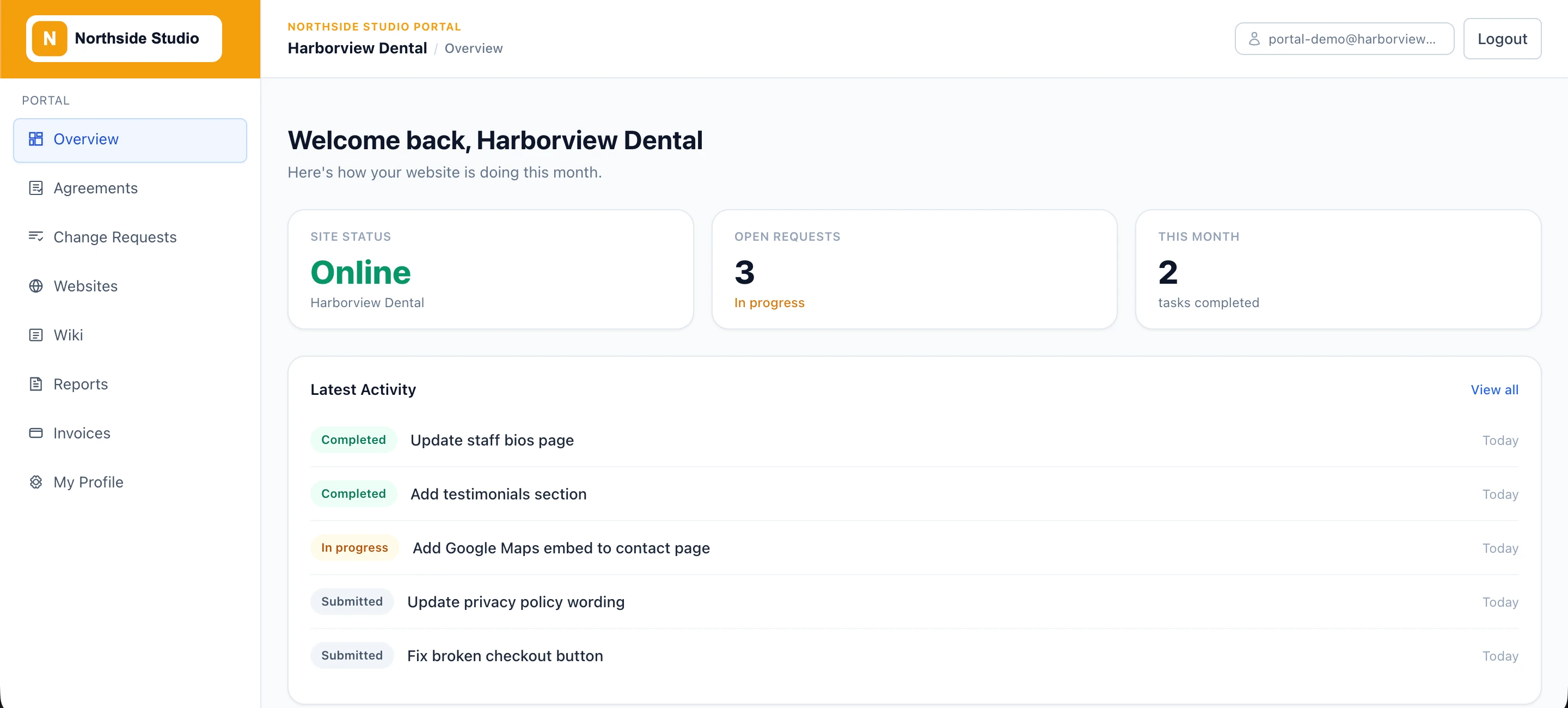
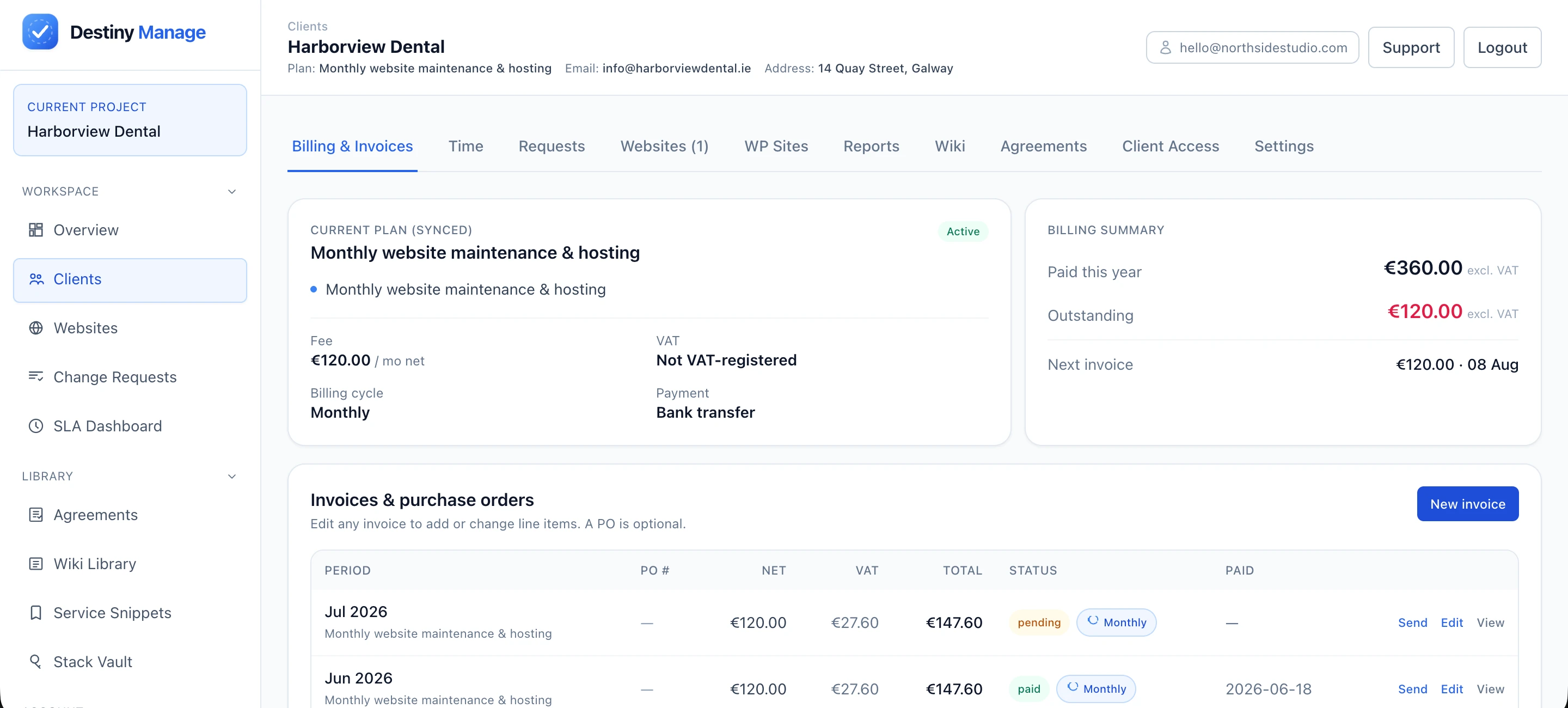
Behind that branded surface, the portal content is the care plan itself: uptime and site health, change requests with comments and attachments, agreements with e-signatures, a client wiki, SLA tracking, and automated monthly reports.
Try it with your own brand. Destiny Manage is free for your first 5 clients, so you can set up the portal, connect your domain and SMTP, and run the six-surface test yourself before paying anything. The client portal setup guide walks through it step by step.
A 10-point checklist for evaluating any portal
Whatever platform you are considering, including ours, put it through this list during the trial. Every "no" is a place your client will eventually meet someone else's brand, or you will meet an unexpected limitation.
- Can the portal run on my own domain, with SSL handled automatically?
- Is the login screen fully mine: logo, colours, portal name, favicon?
- Are all transactional emails branded as my agency, not just the marketing-friendly ones? Test the password reset specifically.
- Can emails send through my own SMTP or another properly authenticated route?
- Do PDF reports and invoices carry my branding and business details?
- Is there a "powered by" footer anywhere, and can it be removed on my plan?
- Can I control which features each client sees, so small clients get a simple portal?
- Is white labelling included at my plan level, or a surcharge that changes the economics per client?
- What do clients experience if I leave: can I export my data, and does anything client-facing break immediately?
- Does the vendor ever contact my clients directly, for any reason, including product updates?
A portal that passes all ten stops being "a tool your agency uses" and becomes part of your agency's identity: the address clients bookmark, the emails they trust, and the monthly report that quietly justifies the retainer. That is the entire point of white label, and it is worth being uncompromising about.
Put your brand on every client touchpoint
Destiny Manage gives your agency a white label client portal on your own domain: a branded login, emails sent from your own address, and monthly reports and invoices that carry your name. Set it up, run the six-surface test from this guide, and see it through your clients' eyes before you pay anything.
Start free with 5 clients